
What Is a Tech Pack? What to Include and How to Create One
5 October 2026
If you've contacted a clothing manufacturer, you've probably been asked the same question: "Do you have a tech pack?" For many new brands, this is the moment things slow down. You have a clear idea of the product in your head, but the manufacturer needs it on paper.
In this guide we explain what a tech pack is, what it should include, the most common mistakes, and how you can create one yourself, even if you've never made one before.
What is a tech pack?
A tech pack (short for technical package) is the blueprint of a garment. It tells the manufacturer exactly how to make your product: what it looks like, which materials to use, how it should fit, where the artwork goes and how it should be labeled and packed.
Think of it as the single document everyone works from: the pattern maker, the sample room, the fabric buyer and the quality team. When the tech pack is clear, everyone builds the same garment you have in mind.
Why do you need a tech pack?
- Accurate samples: the first sample is much closer to what you want, so you need fewer rounds of changes.
- Accurate quotes: a manufacturer can only price what it can see. Fabric, trims, artwork techniques and packaging all affect the cost.
- Fewer misunderstandings: written measurements and details leave less room for guesswork, especially when you work across languages and time zones.
- Consistent reorders: when you produce the same style again, the tech pack makes sure it comes out the same.
- A record of your design: it documents your product and every decision you made about it.
What to include in a tech pack
Tech packs vary from brand to brand, but a complete one usually covers these sections.
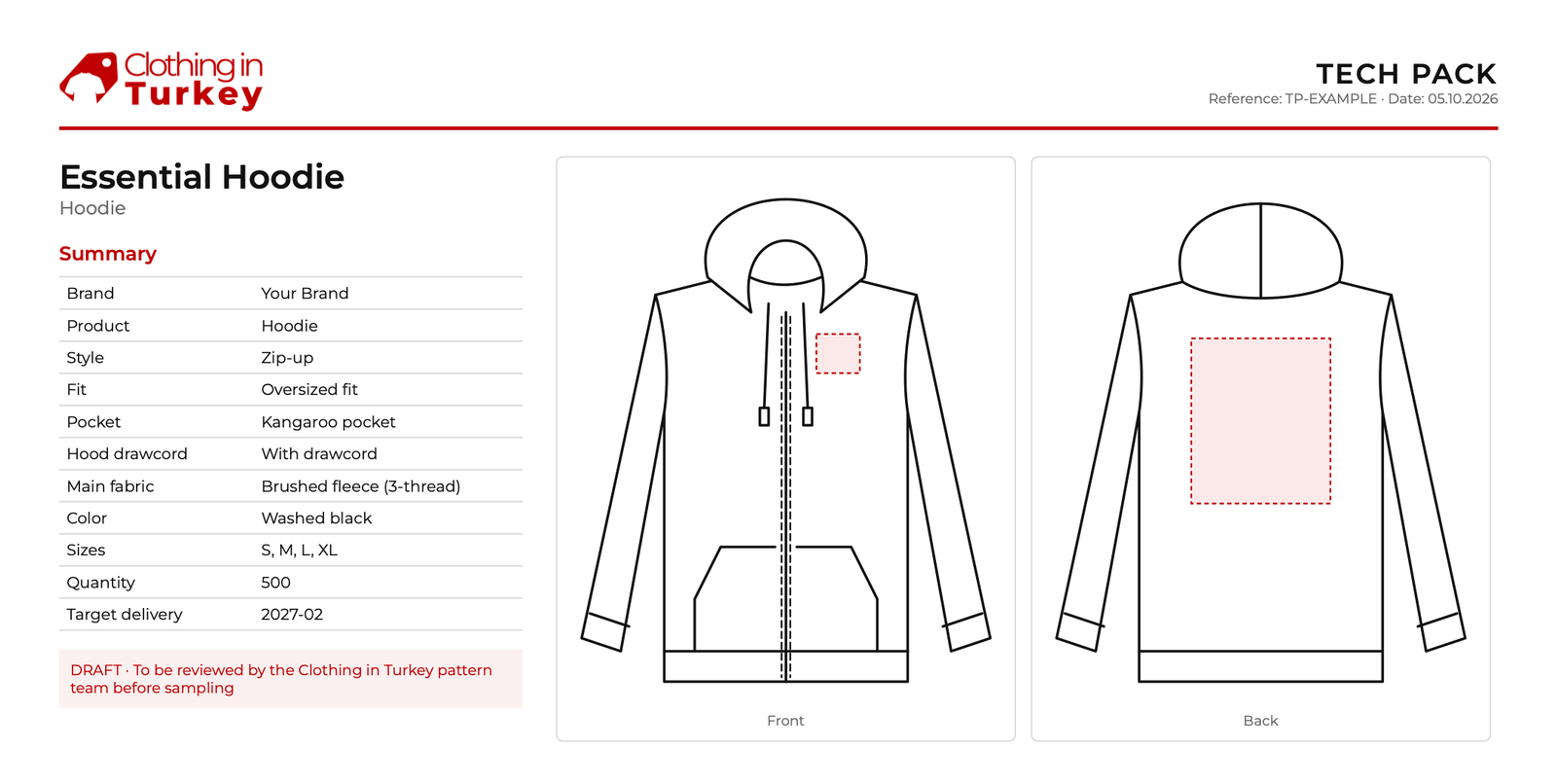
1. Technical sketches (flats)
Flat, black-and-white drawings of the front and back of the garment, without a model or shading. They show the construction clearly: seams, pockets, neckline, cuffs, closures and topstitching. Add close-up drawings for any detail that needs explaining.
2. Design details
The key choices that define the style: fit (slim, regular, oversized), neckline, sleeve length, pocket type, closures and any special finishes. If your design differs from a standard style, describe the differences in words as well as in the sketch.
3. Fabric and bill of materials (BOM)
The bill of materials lists everything that goes into the garment: the main fabric (composition, weight and color), linings, rib, interlining, thread and every trim. If you have a fabric reference or a swatch photo, include it.
4. Trims and accessories
Buttons, zippers, snaps, drawcords, elastic, eyelets, patches and tapes. For each one, note the size, color, material and where it goes. A photo of a trim you like saves a lot of back-and-forth.
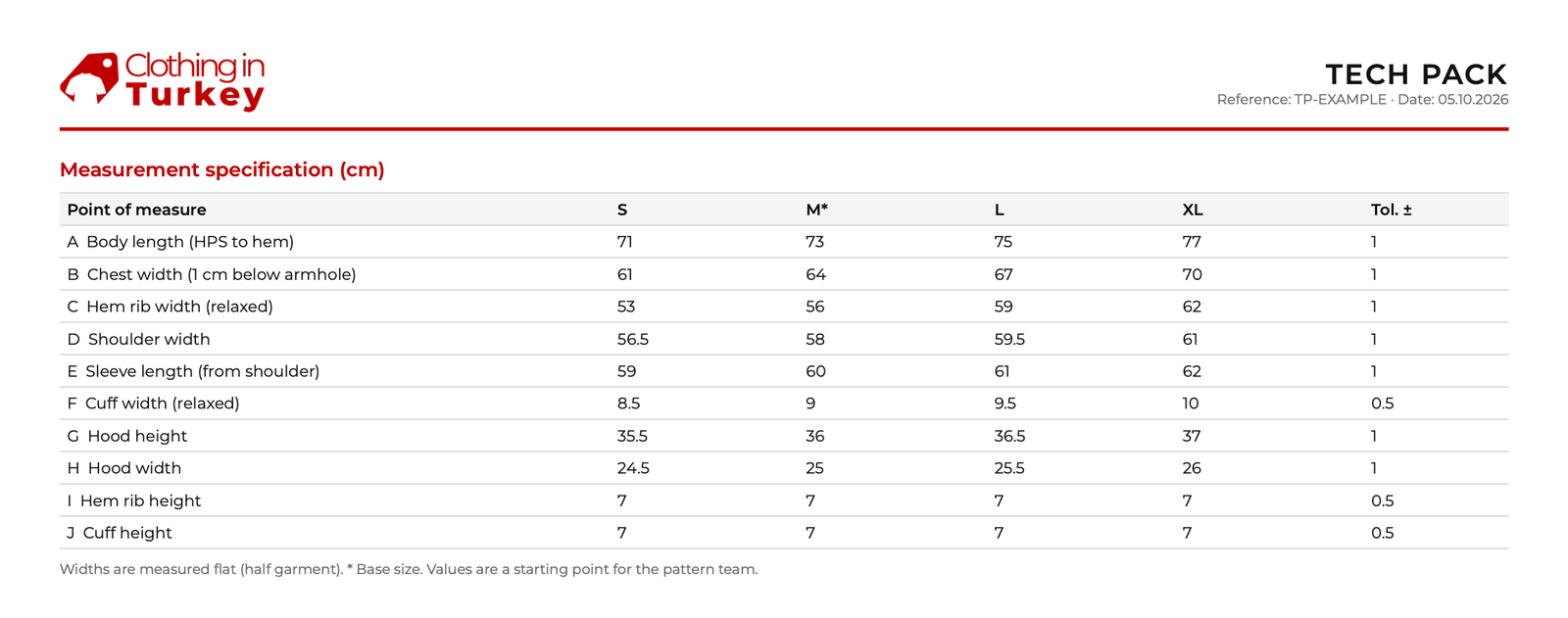
5. Size chart and points of measure
A table of finished garment measurements for each size, such as chest width, body length and sleeve length. Each measurement is a "point of measure" and should say exactly how it's measured (for example, chest width 2 cm below the armhole). If you're not sure of your measurements, you can send a garment whose fit you like, or let a pattern maker propose a size chart for your style.
6. Artwork and branding
Every print, embroidery, patch or wash: the technique, the position on the garment, the size and the colors. Attach your artwork files and mark the placement on the sketch.
7. Labels and packaging
Main label, size label, care label, hang tags and how each garment should be folded and packed (polybag, box, stickers). These small details are part of your brand experience.
8. Colorways and order details
The colors you want to produce, the quantity per color and size, your target price and your timeline. This helps the manufacturer plan production and prepare a realistic quote.
Common tech pack mistakes
- Only sending inspiration photos. A photo shows the look, but not the measurements, fabric or construction.
- Missing back view. The back of the garment matters as much as the front.
- Vague fabric descriptions. "Soft cotton" can mean many things; give the composition and weight if you know them.
- Measurements without explanation. A number without a point of measure can be read in different ways.
- Artwork without size or position. Say where it goes and how big it should be.
- Forgetting labels and packaging. They are part of the product and affect the cost.
How to create a tech pack
Designers often build tech packs in Adobe Illustrator or dedicated fashion software. That works well if you already use these tools, but it can be a steep learning curve for a first collection.
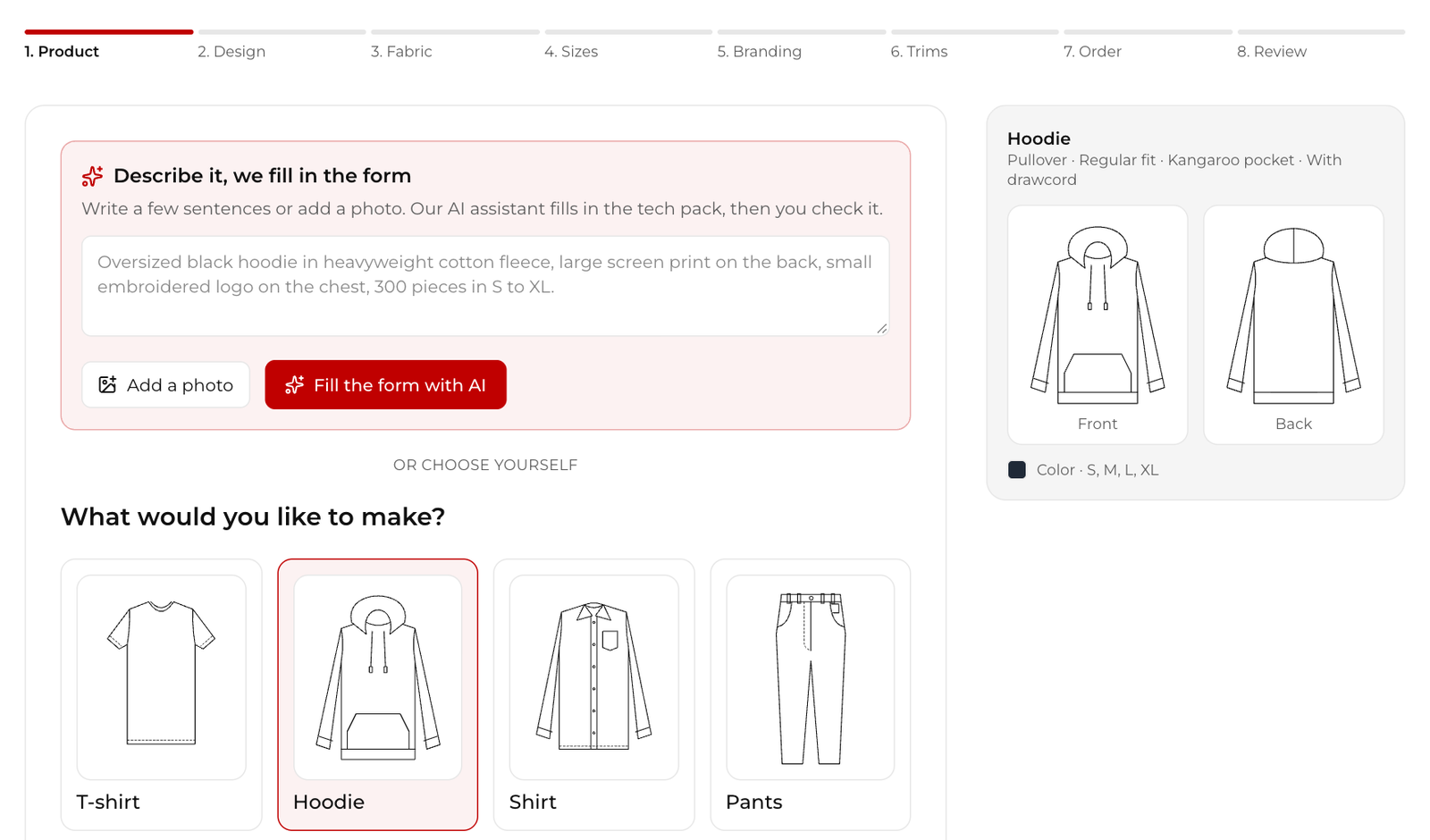
That's why we built a free tech pack builder. You choose your product (t-shirt, hoodie, shirt, pants, shorts, dress, skirt, jacket, activewear or kidswear) and go through simple steps: design, fabric, sizes, branding, trims and order details. The sketch updates as you choose. You can also describe your product in a few sentences or upload a photo, and our AI assistant fills in the details for you to check.
If your product isn't in the list, choose "Other garment", describe it and add your own sketch or photos; our AI can draw a front and back sketch from your description. When you're done, you send it to us and download your tech pack as a PDF.
Already have a tech pack? You can upload it instead, as a PDF or images.
What happens after you send your tech pack
A tech pack you create yourself is a strong starting point, but it doesn't need to be perfect. When we receive one, our pattern team checks every detail and measurement, comes back to you with any questions, and prepares the final version. You get a private link where you can approve it or ask for changes.
After approval, we create the digital pattern and make your first sample. Pattern making and sampling take around 2 weeks on average, depending on the style. The pattern is delivered as a DXF file and belongs to you.
Frequently asked questions
Do I need a tech pack to work with a manufacturer?
Most manufacturers ask for one, because it makes samples and quotes accurate. If you don't have one, a sketch, photos or a reference garment are a good start, and we can help you turn them into a tech pack.
Do I need a separate tech pack for each style?
Yes. Each style gets its own tech pack, because the sketches, materials and measurements are different. Colorways of the same style can usually share one.
Can I use my tech pack with another manufacturer?
Yes. A tech pack you create with our builder is yours to keep and use.
Ready to start?
A good tech pack is the fastest way from an idea to a sample you're happy with. Create your free tech pack, or tell us about your project and we'll help you with the next steps. Starting a new brand? See how we work with new brands.
Ready to start your production?
Create a free tech pack in a few minutes, or answer three quick questions and we'll show you the best way to start.